• Home
  • Support
    • Help
    • Forum
    • Contact Us
    • Blog
  • Mobile
    • VLC Streamer
    • VLC Remote
    • Off Remote
    • File Getter
    • Video Analysis
  • Mac OS
    • Multi Monitor Wallpaper
    • Perfect Wallpaper
    • Right Click Booster
    • Icon Tool
  • Windows
    • Bonjour Browser
Home

Support

  • Home
  • Help
  • Forum
  • Contact Us
  • Blog

Mobile

  • VLC Streamer
  • VLC Remote
  • Off Remote
  • File Getter
  • Video Analysis

Mac OS

  • Multi Monitor Wallpaper
  • Perfect Wallpaper
  • Right Click Booster
  • Icon Tool

Windows

  • Bonjour Browser

Mobile Messages…

Messages from Hobbyist Software

UI Element Colour Chart

10 February 2020

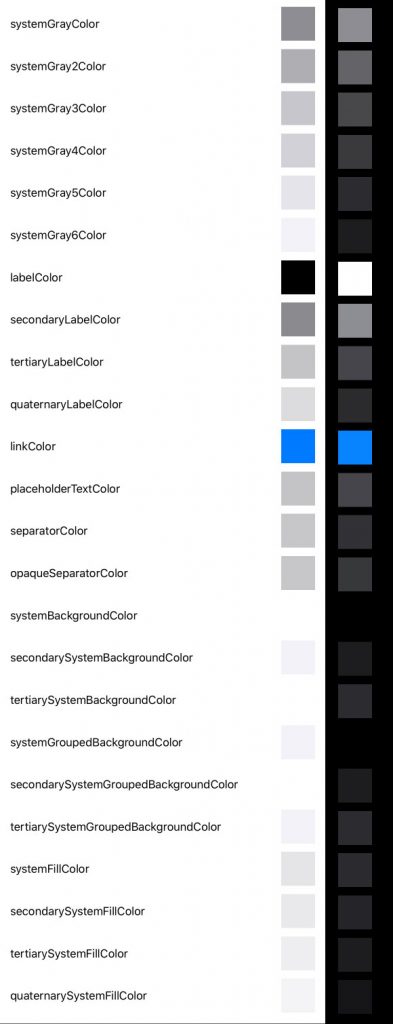
Apple provides dynamic colours which match the system.

I couldn’t find a chart showing what they look like in light and dark mode, so here it is.

Dynamic Colours – light mode on the left – dark mode on the right
← Adding Codeable to @Published Dolby Codecs, Legal Threats: Coda →

Recent posts

  • You can create your own SwiftUI Environment…
  • How to access related files in the Mac Sandbox
  • @MainActor – The Rules!
  • Swift Concurrency Protocol & @MainActor
  • Five ways to break Swift Concurrency
  • @MainActor – not guaranteed
  • Fool me once… Reporting bugs to Apple
  • Dynamic Wallpaper Wierdness (again)

Pages

  • Wrong Wifi
  • Multi Monitor Wallpaper Screen Layout Tips
  • Multi Monitor Wallpaper – Reset Wallpapers
  • Multi Monitor Wallpaper – Reset File Access
  • VLC Streamer : Troubleshooting
  • VLC Remote : Troubleshooting
  • Security Software
  • Uninstalling…
  • Every post →
  • Subscribe by RSS
Home |  Custom Development |  About Us |  Terms of use |  Privacy policy
© Hobbyist Software - All rights reserved. Hobbyist Software is a trading name of Hobbyist Software Limited.
Registered office 12 Fraley Rd, Westbury on Trym, Bristol. Registered in England. Company no:7876492